


Check that the battery is fully seated and charged, then check the display cable connection. If those are fine, look in your user manual for lock or anti-theft settings.

Electric Bike Display Not Working? Here's What to Check First
Written by: Tom Fortune | June 25, 2026 | Time to read 5 min
A dead display is alarming, but it rarely means something is seriously wrong. Most of the time, the electric bike fix is easier than you think.

More about the Author: Tom Fortune
Tom is a Brit living in the French Alps. When he's not creating written and video content for various brands, he's either pedalling or snowboarding around his local mountains. E-Bikes have unlocked the potential for Tom to explore Alpine terrain and get away from the crowded bike parks. He is only too keen to share his knowledge and experience with other riders.

A blank e-Bike display is one of those faults that can look worse than it is. The screen going dark doesn't mean the motor is dead or the battery has failed. Most display problems come down to power, connections, or water, and the majority can be sorted at home before you even think about taking it to a bike shop.
Table of Contents
What the Display Does
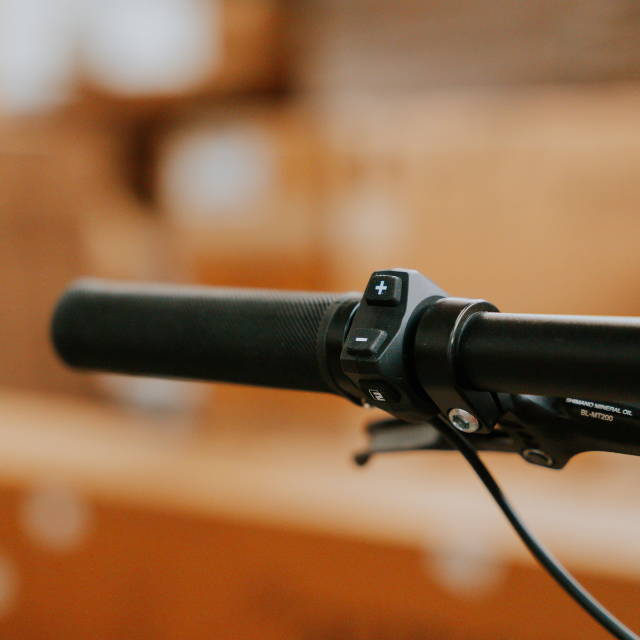
The display unit on an e-Bike isn't just a screen. It's the interface between you and the motor controller, showing battery level, assist mode, speed, and error codes. When something goes wrong elsewhere in the system, the display is usually where you'll hear about it first. That's worth keeping in mind, as a blank or frozen screen doesn't always mean the display itself is the problem.
👋 Welcome to Upway!
Upway is your top destination for buying and selling e-Bikes online. Discover your next e-Bike at up to 60% off retail prices, available in new or like-new condition.
The Display Is Completely Blank
The first thing to try is removing the battery and putting it back in. A battery that looks properly seated can still be missing that last click of contact, and that's enough to kill the display entirely. Once it's firmly back in, press the power button and give it a few seconds before doing anything else.
Some displays have a small internal battery that runs the clock and stores your settings. After a long winter in the garage, this can go flat, causing the display to behave strangely or refuse to start. Check your user manual to see if yours has one, and replace it if needed.
If neither of those fixes it, find the cable that runs from the display down to the motor controller and check where it connects to the main wiring harness. This connector can work loose after a rough ride or a knock during transport. Push it in firmly and try again.
The last thing to check before assuming something is broken is the lock mode. Some electric bike displays stay dark until you press buttons in a specific order or unlock through the app. Check your user manual for the unlock procedure if the screen seems completely unresponsive.

| What you see | Likely cause | First move |
|---|---|---|
| Completely blank screen | No power, flat battery, loose connection | Reseat battery, check charge level, check display cable |
| Blank screen after storage | Internal battery flat, BMS protection | Charge fully, check internal battery |
| Screen flickers or cuts in and out | Loose connector, damaged display wiring | Check cable connections, look for damaged wires |
| Lock icon showing | Anti-theft or lock mode active | Consult user manual for unlock procedure |
The Display Turns On But Acts Strangely
If the display comes on but it isn't behaving as it should, you're dealing with something different.
For example, if the speed is stuck at zero, even though you're moving, it is almost never a display fault. The sensor magnet on your spoke has most likely shifted position or collected debris. Find it, line it up with the speed sensor, and the reading should correct itself.
Sometimes you'll get buttons that aren't doing anything. If this happens, it's worth trying a proper restart first. Hold the power button for several seconds for a full shutdown, not just a quick press. Sticky or unresponsive buttons after a wet ride often indicate that moisture could have gotten into the control unit, which I cover later on in this blog.
If the battery percentage shows as empty even though you know it's charged, you may have a trickier issue on your hands. It is more likely a calibration or communication issue than a battery problem. If the bike cuts out when the display shows 'empty', the battery needs to be checked. Neither is urgent, but both are worth mentioning to a shop if they keep happening.
Error codes on the display are the most useful diagnostic tool you have. The same number means different things on different motor systems, so don't rely on a forum post for the answer. Your user manual is the first stop, and the Upway Bosch error codes guide is useful if you're on a Bosch system. Clear the code once and see if it returns. If it keeps coming back after every restart, stop clearing it and get the bike to a shop.
Water Damage and Display Problems
Water causes more display problems than anything else, and it's usually not from riding in the rain. It's from washing the bike. Most displays are water-resistant, not waterproof, and pointing a jet wash at the display is one of the more reliable ways to cause a problem that looks like an electrical fault but is physical damage.
If your display starts behaving strangely after a wet ride, turn the bike off and remove the battery if you can. Don't keep pressing buttons trying to test it, as more water can seep in. Leave it somewhere warm and dry for at least a day before switching it back on. Forcing current through wet electronics can cause permanent damage before the display has had a chance to dry out.
The connectors where the display cable meets the wiring harness are worth checking, too. That's where water tends to get in, and seals wear down on bikes that get hosed down regularly. If there's any sign of corrosion or the display is still not right after drying out, you'll need specialist help.
Firmware and Software Issues
If the display is doing something strange that started without any obvious physical cause, you might want to try a firmware update before assuming anything is broken.
Most major brands push updates via Bluetooth through their corresponding apps. Bosch, Specialized, Trek, and others all have apps that can update the display firmware wirelessly. If the display won't connect to the app, restart both the bike and your phone, then try again. Half the time, that's enough to get things moving.
A frozen screen or garbled display can sometimes be cleared with a hard reset. On many systems, holding the power button for ten seconds will do it. Pulling the battery out for thirty seconds and putting it back in has the same effect on some bikes. Your user manual will have the exact reset sequence for your system.
Physical Damage
A cracked screen, a broken mount, or a button that won't click anymore are easy to spot, but fixing them is less straightforward than it might seem. Most displays on name-brand bikes are proprietary, and you can't just order a generic replacement. The right Bosch display for your system and model year matters, and the connector fitting is the least of it.
A crack that isn't affecting anything yet is still worth dealing with. Water can find its way in, and what starts as cosmetic damage can soon become an electrical problem after a few wet rides.
Don't be tempted by a display from a different bike, even one that looks identical. Compatibility comes down to the motor system, the firmware version, and how the units communicate.
When To Stop Troubleshooting
Everything covered here is safe to check yourself. After this, stop. Don't open the display unit, don't cut wires, and don't try to work around the system. These are sealed for good reason, and improvising can void your warranty on top of whatever problem you already had.
If the same error code keeps coming back after every restart, take the bike to a shop. The same applies if the display started behaving differently after a crash, if you think water has got into the motor controller and not just the screen, or if the display is showing multiple faults at the same time.
Buying a Pre-Owned E-Bike? Here's What to Know

Display faults are among the hardest things to spot when buying a used e-Bike privately. A bike can turn on, show a reading, and feel fine for ten minutes on a test ride, and still have an intermittent display fault that only shows up under load or in certain conditions.
Every e-Bike on Upway goes through a 50-point inspection before it goes on sale, covering the electrical system, display function, wiring, and battery communication. Any battery with a capacity below 80% is replaced before the listing goes live. Browse electric city bikes, electric mountain bikes, or the full range of certified pre-owned e-Bikes on Upway.
Frequently Asked Questions
Why is my e-Bike display not turning on?
Can water damage an e-Bike display?
Yes. Most displays are water-resistant, not waterproof. If the display acts up after a wet ride, turn the bike off and let it dry fully before testing again.
What do error codes on the display mean?
They vary by brand and motor system, so always check your own user manual first. If the same code keeps returning after a restart, get the bike to a shop.
Why does my e-Bike display show the wrong battery level?
This is usually a BMS calibration or communication issue. If the bike cuts out before the display reaches zero, the battery itself needs checking.
Can I replace my e-Bike display myself?
On some bikes, yes, but compatibility matters. The replacement must match your motor system and firmware version, not just the connector shape
Key Takeaways
- Most blank or faulty e-Bike displays come down to power, connections, or water. Reseat the battery, check the display cable, and inspect the connectors before assuming the display itself has failed.
- Water damage is the most common cause of display problems after riding in wet conditions. Turn the bike off, remove the battery, and let it dry fully before switching it back on.
- A display fault that persists after checking the basics, or an error code that keeps returning after every restart, requires a shop with the right diagnostic tools to be resolved properly.

MY WISHLIST
Your wishlist is empty.
Continue shopping
Drop Us A Line
We’re happy to answer any questions you have or provide you with an estimate. Just send us a message in the form below with any questions you may have.
Continue shopping