Sometimes you can still pedal without assist. But if the code is about braking, a short circuit, or repeated motor faults, stop and sort it out before you ride further.
Serial 1 E-Bike Error Codes: What Your Brose System Is Trying to Tell You
Written by: Chris Van Leuven | January 31, 2026 | Time to read 6 min
Serial 1 e-Bike error codes explained—Brose alerts and two-digit codes, speed sensor fixes, Enviolo hub signals, and when to call a shop for an e-Bike repair.

More about the Author: Chris Van Leuven
Chris is a writer, climber, and founder of Yosemite E-Biking in Mariposa, CA. When he’s not tackling Sierra Foothills trails or scaling rock walls, he’s crafting adventure stories with his boxer, Fenster. His work has appeared in Outside, Men’s Journal, Gripped, and Best American Sports Writing.
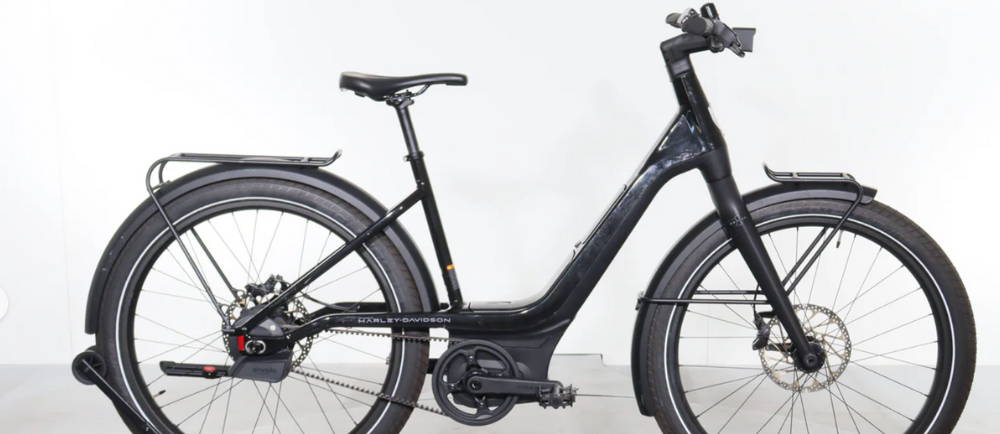
Serial 1 e-Bikes are designed to disappear beneath you—internal wiring, a Gates Carbon Belt Drive, and, on many models, an Enviolo auto-shifting hub. Even the most “low-maintenance” setup still depends on sensors, software, and a web of connectors. When something feels off, the bike flashes a message or an error code. That’s your cue: start with the quick, safe checks. Don’t waste time guessing.
This Electric Bike Maintenance Costs and Schedule guide is here to help you rule out the obvious in just a few minutes. If it’s clearly beyond a home fix, that’s when you bring in a shop or dealer.
👋 Welcome to Upway!
Upway is your top destination for buying and selling e-Bikes online. Discover your next e-Bike at up to 60% off retail prices, available in new or like-new condition.
Table of Contents
Identify your Serial 1 display: RUSH/CTY vs. MOSH/CTY
Common Brose display messages: non-numbered alerts
Brose numeric error codes: most common
Error codes 10-12, 24: Battery / Voltage
Error codes 20-46: Electrical Measurement / Current
Error codes 42-45: Motor Rotation / Short Circuit
Error codes 70-74: Pedal Force / Cadence Sensor
Error code 80-84: Software / Parameters
Enviolo hub signals: RUSH/CTY models
Identify Your Serial 1 Display: RUSH/CTY vs. MOSH/CTY
Serial 1 bikes usually fall into two camps when it comes to displays. This changes whether you see a plain-English alert or a two-digit code.
- RUSH/CTY models: Brose display interface with on-screen messages/menus.
- MOSH/CTY models: Brose display/remote setup with a simpler interface.
Why does this matter? One rider might see “Check Speed Sensor.” Another gets a two-digit code. Both are often pointing to the same problem.
Common Brose Display Messages: Non-Numbered Alerts
You’ll see these messages often. Most come down to a bumped alignment, a loose plug, or a quick communication hiccup.
1) “Check Speed Sensor”
What it usually means: the system isn’t seeing wheel speed.
Try this first:
- Find the speed sensor near the wheel and the spoke magnet.
- Make sure the magnet passes close to the sensor on every rotation (close and consistent, not rubbing, not inches away).
- If it got bumped, realign it and try again.
2) “Check Light”
What it usually means: a lighting circuit issue (loose plug, pinched wire, or connector not fully seated).
Try this first:
- Toggle the headlight off/on.
- Check any visible light wiring/connectors for damage or looseness.
3) “Restart System”
What it usually means: the system wants a clean reboot (a temporary fault or a brief communication dropout).
Try this first:
- Full power cycle.
- Restart with no pressure on the pedals.
4) “Check Brake Light”
What it usually means: brake sensor or brake-light signal issue.
Try this first:
- Make sure both brake levers return fully and aren’t stuck slightly “pulled.”
- If you recently adjusted the brakes or changed the levers, a shop may need to confirm the sensor/cutoff behavior.
🤝 Why you can trust us for buying an e-Bike?
- Great prices: Get your next e-Bike for up to 60% off retail prices, in new or like-new conditions.
- Quality Guaranteed: Every e-Bike is rigorously certified by a team of professional mechanics, and comes with a 1-year warranty.
- Delivered to Your Door: Delivered to your home within a week. Change your mind? Return it thanks to our 14-day return policy.
🚲 We also buy e-Bikes. Click here for an estimation!
Brose Numeric Error Codes: Most Common
Depending on your Brose setup, you may see a two-digit code. Below are common Brose codes and the standard “first response” recommendations.
Error codes 10-12, 24: Battery / Voltage
- Error code 10: Battery voltage too low → Charge the battery.
- Error code 11: Battery voltage too high → Power cycle; if it persists, dealer/shop.
- Error code 12: Battery almost/completely discharged → Charge the battery.
- Error code 24: Internal voltage outside working range → Charge the battery.
Error codes 20-46: Electrical Measurement / Current
- Error code 20: Electrical measurements incorrect → Power cycle; if it persists, dealer/shop.
- Error code 21: Thermal sensor defective → Don’t guess. Shop time.
- Error code 25: Error in motor current measurement → Power cycle; if it persists, shop.
- Error code 26: Software reset completed → If it repeats or pairs with other faults, shop.
- Error code 40/41: Overcurrent in motor → Reduce load (lower assist, pedal easier).
- Error code 44: Motor overheating → Reduce load and let it cool.
- Error code 46: No motor movements recognized → Often not a DIY fix. Shop.
Error codes 42-45: Motor Rotation / Short Circuit
- Error code 42: Fault in motor rotation → Power cycle; if it persists, shop.
- Error code 43: Short circuit in motor → Stop riding and contact a shop.
- Error code 45: Software corrected an error in motor rotation → Power cycle; if it repeats, shop.
Error code 60: Communication
- Error code 60: CAN-BUS communication interruption → Check cables/plug connections; if it persists, shop.
Error codes 70-74: Pedal Force / Cadence Sensor
- Error code 70: Pedal force not in valid range → Restart with no pressure on pedals; if it persists, shop.
- Error code 71: Pedal turning not detected → If it repeats, shop.
- Error code 72: Pedal force not detected → If it repeats, shop.
- Error code 73: Pedal force sensor connection interrupted → If it doesn’t clear, shop.
- Error code 74: Errors found in the data → If it repeats after restart, shop.
Error code 80-84: Software / Parameters
- Error code 80: Incorrect motor parameter → Restart; if it persists, shop.
- Error code 81: Speed signal not recognized → Check spoke magnet alignment at the speed sensor.
- Error code 82: Program manipulated → Shop/dealer.
- Error code 83: Error in program sequence → Shop/dealer.
- Error code 84: Incorrect motor parameter → Shop/dealer.
Here’s the bottom line: if you’ve restarted, checked the speed sensor magnet, and the code keeps coming back, you’re not troubleshooting anymore. You’re confirming it needs a real diagnostic.
Enviolo Hub Signals: RUSH/CTY models
Pairing/connection (quick check):
Serial 1’s Help Center notes that you can press and hold the small white button on the hub interface until it begins flashing blue to enter pairing mode.
What the hub interface light is telling you (common patterns):
- Blue light: connected to a phone via Bluetooth
- Flashing blue: pairing mode
- Flashing green: bike is being pedaled (or in reverse)
- Flashing red: bike is in motion
- Flashing red + green: hub is asking to be recalibrated
If you’re seeing Enviolo-specific issues, Serial 1 also notes that the Enviolo app may prompt for hub software updates, which can affect behavior.
When to Stop Riding and Contact a Shop
- The error involves a short circuit or repeated motor-rotation faults (don’t gamble)
- The bike won’t stay on, won’t assist consistently, or throws the same code immediately after a restart
- You smell hot electronics, see melted plastic, or notice sparking/arching at a connector
- The battery won’t charge normally, or you’re seeing a persistent voltage error. If you want your Serial 1 experience to stay low-drama, this is where a good dealer earns their keep.
Frequently Asked Questions
Can I still ride if I have an error code?
Why did the code disappear after a restart?
A lot of faults are just momentary—a quick sensor dropout, a connector that vibrated loose, or a brief communication hiccup. A restart clears things up, but if the real problem persists, the code will return.
What’s the single most common physical cause?
A speed sensor magnet that’s drifted out of position is a classic culprit. Brose specifically recommends checking the spoke magnet if you’re seeing speed-signal errors.
Key Takeaways
- Start with a clean power cycle and check the speed sensor magnet. You’d be surprised how many “random” errors disappear right there.
- The type of display matters. The same issue might show up as a message on one bike and a code on another.
- If the code comes back right after a restart, stop guessing. It’s time for diagnostics—especially on RUSH/CTY models, where the Enviolo hub might also need calibration.
There is more to Explore
Visit below articles for more info about electric bikes